


Page 32 - DT14-1
P. 32
32-Cutting Edge-Q8_6-7-8-Ivoclar.qxd  4/16/2024  10:09 PM  Page 1


               32 cutting edge                                                                DENTAL TECHNOLOGY, JANUARY-MARCH 2024


              Smile Creator module presents


              new and innovative features


              Dr. Paul Schnitzspan, Director of Software Quality Assurance and Medical Software Development
              at exocad, elaborates on the latest features of the Smile Creator module


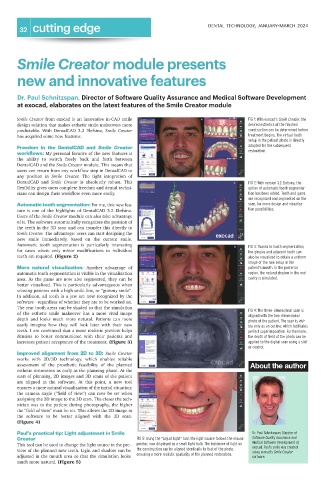
              Smile Creator from exocad is an innovative in-CAD smile                                          FIG 1: With exocad's Smile Creator, the
              design solution that makes esthetic smile makeovers more                                         desired esthetics of the finished
              predictable.  With  DentalCAD  3.2  Elefsina,  Smile  Creator                                    construction can be determined before
              has acquired some new features:                                                                  treatment begins. The virtual tooth
                                                                                                               setup in the patient photo is directly
              Freedom  in  the  DentalCAD  and  Smile  Creator                                                 adopted for the subsequent
                                                                                                               restoration.
              workflows: My personal favorite of the new features is
              the  ability  to  switch  freely  back  and  forth  between
              DentalCAD and the Smile Creator module. This means that
              users can return from any workflow step in DentalCAD to
              any  position  in  Smile  Creator. The  tight  integration  of
              DentalCAD  and  Smile  Creator is  absolutely  robust.  This                                     FIG 2: With version 3.2 Elefsina, the
              flexibility gives users complete freedom and dental techni-                                      option of automatic tooth segmenta-
              cians can design their workflow even more easily.                                                tion has been added. Teeth and gums
                                                                                                               are recognized and segmented on the
              Automatic tooth segmentation: For me, this new fea-                                              scan, for more design and visualiza-
              ture  is  one  of  the  highlights  of  DentalCAD  3.2  Elefsina.                                tion possibilities.
              Users of the Smile Creator module can also take advantage
              of it. The software automatically recognizes the position of
              the teeth in the 3D scan and can transfer this directly to
              Smile Creator. The advantage: users can start designing the
              new  smile  immediately,  based  on  the  current  smile.
              Automatic  tooth  segmentation  is  particularly  interesting                                    FIG 3: Thanks to tooth segmentation,
              for  cases  where  only  minor  modifications  to  individual                                    the gingiva and adjacent teeth can
              teeth are required. (Figure 2)                                                                   also be visualized to obtain a uniform
                                                                                                               image of the new setup in the
              More  natural  visualization: Another  advantage  of                                             patient's mouth. In the posterior
              automatic tooth segmentation is visible in the visualization                                     region, the natural shadow in the oral
              area. As the gums are now also segmented, they can be                                            cavity is simulated.
              better visualized. This is particularly advantageous when
              viewing patients with a high smile line, or “gummy smile”.
              In addition, all teeth in a jaw are now recognized by the
              software - regardless of whether they are to be worked on.
              The rear tooth areas can be shaded so that the simulation
                                                                                                               FIG 4: The three-dimensional scan is
              of  the  esthetic  smile  makeover  has  a  more  vivid  image
                                                                                                               aligned with the two-dimensional
              depth  and  looks  much  more  natural.  Patients  can  more
                                                                                                               photo of the patient. The scan is visi-
              easily  imagine  how  they  will  look  later  with  their  new                                  ble only as an outline, which facilitates
              teeth. I am convinced that a more realistic preview helps                                        perfect superimposition. Furthermore,
              dentists  to  better  communicate  with  their  patients  and                                    the depth of field of the photo can be
              increases patient acceptance of the treatment. (Figure 3)                                        applied to the digital scan using a slid-
                                                                                                               er control.
              Improved  alignment  from  2D  to  3D: Smile  Creator
              works  with  2D/3D  technology,  which  enables  reliable
              assessment  of  the  prosthetic  feasibility  of  the  planned                                    About the author
              esthetic restoration as early as the planning phase. At the
              start of planning, 2D images and 3D scans of the patient
              are  aligned  in  the  software.  At  this  point,  a  new  tool
              ensures a more natural visualization of the initial situation:
              the camera angle ("field of view") can now be set when
              assigning the 2D image to the 3D scan. The closer the tech-
              nician was to the patient during photography, the higher
              the "field of view" must be set. This allows the 2D image in
              the  software  to  be  better  aligned  with  the  3D  scan.
              (Figure 4)
              Paul's practical tip: Light adjustment in Smile                                                    Dr. Paul Schnitzspan, Director of
              Creator                                           FIG 5: Using the "adjust light" tool, the light source follows the mouse  Software Quality Assurance and
              This tool can be used to change the light source in the pre-  pointer, now displayed as a small light bulb. The incidence of light on  Medical Software Development at
                                                                                                                 exocad. Paul's smile was created
              view of the planned new teeth. Light and shadow can be  the construction can be aligned identically to that of the photo,  using exocad's Smile Creator
                                                                ensuring a more realistic spatiality of the planned restoration.
              adjusted in the mouth area so that the simulation looks                                            software.
              much more natural. (Figure 5)

