


Page 25 - DT14-1
P. 25
24-27-KLINGNER article-Q8_6-7-8-Ivoclar.qxd  4/15/2024  8:37 PM  Page 2


              DENTAL TECHNOLOGY, JANUARY-MARCH 2024
                                                                                       prosthetic section   25


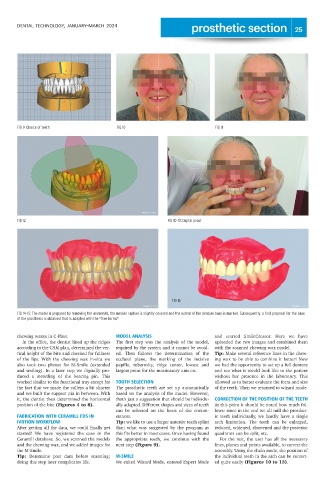
              FIG 9: Choice of teeth                   FIG 10                                    FIG 11


              FIG 12                                                         FIG 10-13: Digital proof


                                                                               FIG 15

              FIG 14-15: The model is prepared by removing the undercuts, the median raphae is slightly covered and the extent of the denture base is marked. Subsequently, a first proposal for the base
              of the prosthesis is obtained that is adapted with the "free forms"


              chewing waxes in C-Plast.                MODEL ANALYSIS                            and  started  SmileCreator.  Here  we  have
                In the office, the dentist lined up the ridges  The  first  step  was  the  analysis  of  the  model,  uploaded the two images and combined them
              according to the CAM plan, determined the ver-  required by the system and it cannot be avoid-  with the scanned chewing wax model.
              tical height of the bite and checked for fullness  ed.  Then  follows  the  determination  of  the  Tip: Make several reference lines in the chew-
              of  the  lips.  With  the  chewing  wax  in-situ  we  occlusal  plane,  the  marking  of  the  incisive  ing wax to be able to combine it better! Now
              also  took  two  photos  for  M-Smile  (extended  papilla,  tuberosity,  ridge  center,  lowest  and  we had the opportunity to set up a full denture
              and smiling). In a later step we digitally pro-  largest point for the masticatory unit etc.  and see what it would look like to the patient
              duced  a  recording  of  the  bearing  pin.  This                                  without  her  presence  in  the  laboratory.  This
              worked similar to the functional tray except for  TOOTH SELECTION                  allowed us to better evaluate the form and size
              the fact that we made the valleys a bit shorter  The  prosthetic  teeth  are  set  up  automatically  of the teeth. Then we returned to wizard mode.
              and we built the support pin in between. With  based on the analysis of the model. However,
              it, the dentist then determined the horizontal  that's just a suggestion that should be individu-  CORRECTION OF THE POSITION OF THE TEETH
              position of the bite (Figures 4 to 8).   ally adapted. Different shapes and sizes of teeth  At this point it should be noted how much fol-
                                                       can  be  selected  on  the  basis  of  the  circum-  lows: since in the end we all mill the prosthet-
              FABRICATION WITH CERAMILL FDS IN         stances.                                  ic  teeth  individually,  we  hardly  have  a  single
              IVOTION WORKFLOW                         Tip: we like to use a larger anterior teeth splint  arch  limitation.  The  teeth  can  be  enlarged,
              After getting all the data, we could finally get  than  what  was  suggested  by  the  program  as  reduced, widened, shortened and the posterior
              started!  We  have  registered  the  case  in  the  this fits better in most cases. Once having found  quadrants can be split, etc.
              Ceramill database. So, we scanned the models  the  appropriate  teeth,  we  continue  with  the  For the rest, the user has all the necessary
              and the chewing wax, and we added images for  next step (Figure 9).                lines, planes and points available, to correct the
              the M-Smile.                                                                       assembly. Using the chain mode, the position of
              Tip: Determine  post  dam  before  scanning;  M-SMILE                              the individual teeth in the arch can be correct-
              doing this step later complicates life.  We exited Wizard Mode, entered Expert Mode  ed quite easily (Figures 10 to 13).

